The rapid production of perfect 3D games is a must-have in today’s game development processes. With ready-made templates, the setup time is cut down without compromising creativity. They offer clear starting points that make initial production easy and future customization easier. AI workflows are also integrated, enhancing efficiency throughout the design process. Framia Pro enhances visual consistency of assets generated, while larger AI platforms facilitate seamless production workflows for creative teams.
Understanding Ready-to-Use 3D Templates in Combos AI
Ready-to-use templates offer full project starting points rather than empty projects. Every template contains organized files, playable environments, core gameplay systems and organized assets. Built-in cameras, navigation and physics minimize tedious pre-production setup before creative production. These foundations also minimize technical barriers for early development. Templates help with the organization while providing flexibility for later modifications. No need to create the same systems in multiple projects. This helps to minimize unnecessary complexities and increase production speed. The assets are still well organized; expansion is easy throughout development. Templates also minimize set-up configuration errors. All projects start from practical structures, rather than manual preparation. Early development is more predictable as core systems are already in harmony with each other. This foundation allows for quicker iteration and more creative direction in the future.
Benefits of Starting with Preconfigured Game Foundations
Foundations are preconfigured and instantly enhance production efficiency across various game concepts. The quicker the scenes can be created, the more time the developer has to devote to gameplay without repetitive configuration. Built-in camera systems facilitate easier navigation, eliminating adjustments; organized project structures, which facilitate organization and expansion, provide cleaner asset management. Maintaining the same folder structure also helps in managing multiple projects. Shared structures shorten collaborative development time. Converge AI adds to these structured foundations, enabling unified creative workflows across connected production activities—less time spent on rebuilding common systems across projects. Stable foundations also minimize technical inconsistencies later in the development process. Sequential processes lead to increased planning before higher features are added. These benefits can boost efficiency and allow for various creative approaches.
Essential Components Available Within Templates
Modern templates feature sensible systems that speed up the development process from the start. These components remove repetitive technical preparation prior to the beginning of creative production. The following factors often facilitate the efficient creation of projects:
-
Manual camera configuration is eliminated with preconfigured camera systems, which boost gameplay from the start.
-
Ground and navigation setup creates playable environments once the project creation is completed.
-
Without a lot of tweaking to the environment, basic physics configuration provides realistic movement.
-
Core mechanics customization setup by starter gameplay logic before customization.
-
Level structures can be expanded to add more mechanics without cluttering the project.
-
Visual editing tools make it easier to make layout changes with intuitive AI-assisted editing workflows.
These built-in features reduce preparation and customization for flexibility in customization. Visual editing allows for rapid experimentation with less coding. Simple editing tools to modify environments without having to rebuild scenes. Enter Pro accommodates not just organized development workflows, but also a wide range of creative. Scalable, organized systems for expanded projects adding gameplay features. This consistency makes for fewer decisions about technical details throughout development.
Steps to Use Ready-to-Use 3D Templates in Combos AI
Step 1: Launch your game with a ready-made template
-
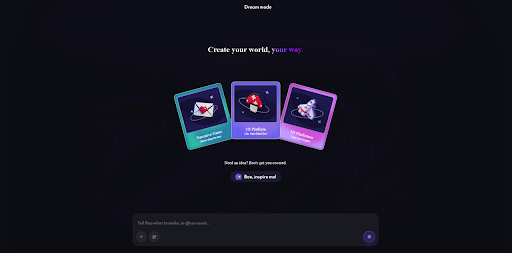
Visit the Combos website and select a “3D Platformer” template to begin with a project that already includes a preconfigured camera, ground, and navigation.
-
Enter a prompt describing your game genre, mechanics, checkpoints, and physics. Boo asks guided questions to refine movement, camera type, and objectives before generating a detailed GDD.
-
Add more direction by using “Attach files”, “Take a screenshot”, and “Draw image”.
Step 2: Expand your template with AI-generated assets
-
Open the “Project Assets” tab and use the “Generator” to create models and animations. You can upload a character or model image and enter a text prompt to describe assets naturally.
-
Generate asset types such as Vehicle, Terrain, and Obstacle. Combos AI then connects them with game logic, including physics and camera controls.
-
Test everything immediately in “Instant Preview” mode, then let Combos AI automatically deploy a shareable 3D game link.
Customize and publish your template-based game
-
Refine your 3D world in the no-code visual editor by adjusting terrain, lighting, and object placement.
-
Add interactive features such as obstacles or finish lines, and use text prompts to modify mechanics like speed or jump height.
-
When everything is ready, click “Publish” to release your completed 3D game.
Customizing Templates Without Starting Over
Templates offer versatile building blocks rather than project constraints. Instead, default assets can be substituted without having to rebuild gameplay systems from scratch—easy character, environment, texture and object adaptation with the help of AI. New mechanics build on current gameplay elements. Interactive objects enhance exploration, puzzles, progression and environmental storytelling in various genres. AI-powered models, textuPersonalizedironmental features create personalized visual identities. These changes maintain project structure and promote innovative organization. Combos AI enables conversational refinement, which involves enhancing mechanics, visuals and gameplay instructions during development. Developers keep developing projects without having to “restart” projects that are done. Incremental customization ensures that previous efforts are not lost, and that new creative concepts are not hindered. Flexible templates are still useful for prototypes and for larger productions.
Integrating AI-Generated Assets into Template-Based Projects
With AI-generated assets, template projects can benefit from a broader visual range without compromising development velocity. Descriptive prompts are used to make character models conform to a variety of play styles. Animation sets include walking, running, jumping, attacking and custom movement sequences. Environmental objects add landscape features, buildings, decorative props and interactive structures to enrich landscapes. The generated sound effects enhance the atmosphere and provide feedback to the game. Framia Pro ensures that generated characters, environments, textures and supporting art are visually consistent. Visual direction is consistent and enhances player immersion dOrganizedelopment. Organized asset integration also makes it easy to make future project updates. AI-generated content continues to work with structured template foundations, eliminating the time-consuming production of repetitive content. Balanced visual styles produce more professional-looking results through full game experiences.
Accelerating Team Collaboration with Converge AI
Organized creative processes with integrated AI environments are beneficial for collaborative game production. Consolidated workspaces help designers, artists, developers and content creators communicate. Sharing creative resources helps to mitigate duplicated efforts and create consistency in production. Quick asset iteration allows for iterative improvements without interrupting development. Resources are generated and can still be accessed throughout connected production activities, enhancing collaboration efficiency. Framia Pro enhances visual production by maintaining the consistency of Organizedstyle between the generated assets and project assets. There is also organized collaboration, which helps to make the project scalable in case of bigger productions. Shared workflows limit any unnecessary changes, yet allow for creative flexibility during several development steps. Structured cooperation maximizes delivery faster without compromising production quality.
Best Practices for Maximizing Template Efficiency
The key to successful template use begins with the clearly defined gameplay Customizes prior to development. Good planning minimizes the amount of unnecessary revisions during production. Make changes to systems over time rather than all at once. Continuous improvements maintain project stability during development. Recycled materials can be used to speed up the production process while maintaining a consistent look. Future projects will also be easier when assets are organized in libraries. This process of regular refinement by visual editing tools allows for ongoing improvement and the need to rebuild finished work. Regular testing ensures that the game is high quality and customization-ready. As projects grow, consistency and organization will help to avoid unnecessary technical complexity. Practical planning, gradual customization and structured asset management maximize development efficiency in the long run.
Conclusion
The ready-to-use templates significantly shorten the development time by reducing preparatory customization and time-consuming technical work. Structured foundations enable organized progress, but also help to maintain creative flexibility during production. Customization with AI helps to make projects smoother without the need for re-construction of built projects—efficient workflows throughout the development stages with organized assets, editing, and scalable project structures. Creative workflows, unified visual production, and template foundations that are flexible and adaptable facilitate polished game production with increased speed, organization and long-term scalability.

Related Posts